Modify a Credit Application
The Edit Credit Application page allows authorised users to modify the details of an existing credit application. Any changes saved will trigger a re-calculation of the applicant’s credit score, giving you an updated result based on the revised data.
To access this page, open an application from the Credit Applications list and select the edit option.
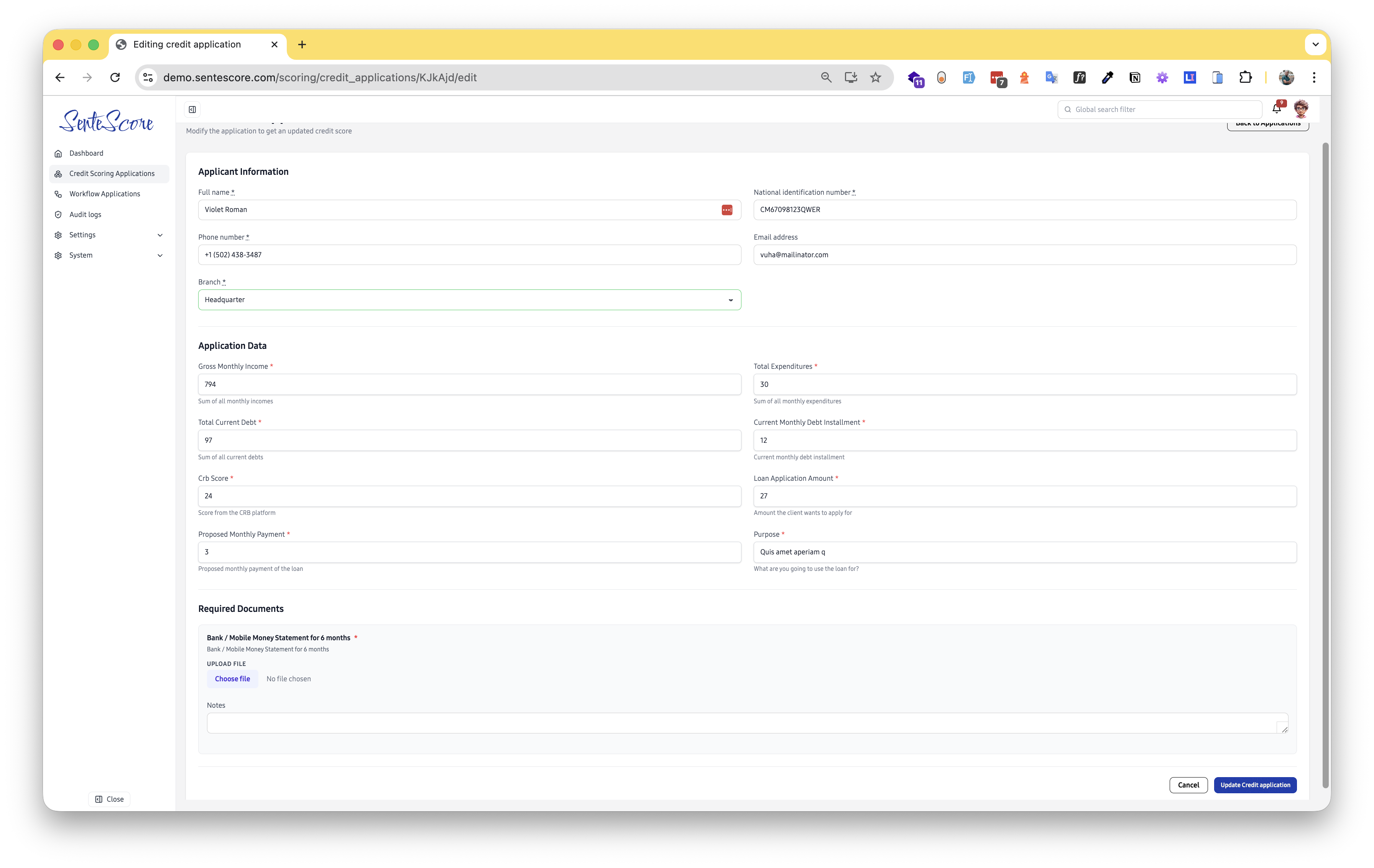
Page Overview
Section titled “Page Overview”The edit form is identical in structure to the New Credit Application form, with all previously entered data pre-filled and ready to modify. It contains three sections: Applicant Information, Application Data, and Required Documents.
Applicant Information
Section titled “Applicant Information”All applicant identity fields are editable and pre-populated with the values from the original submission.
| Field | Required | Description |
|---|---|---|
| Full Name | ✅ Yes | The applicant’s complete legal name. |
| National Identification Number (NIN) | ✅ Yes | The applicant’s government-issued national ID number. |
| Phone Number | ✅ Yes | The applicant’s primary contact number. |
| Email Address | No | The applicant’s email address. |
| Branch | ✅ Yes | The branch associated with the application, selectable from a dropdown. |
Validation Rules
Section titled “Validation Rules”The same strict validation that applies on creation is enforced on edit:
- NIN — Must be a valid, correctly formatted national identification number.
- Phone Number — Must be a valid phone number format (e.g.
+1 (502) 438-3487). - Email Address — If provided, must be a properly formatted email address.
Application Data
Section titled “Application Data”This section contains the financial inputs used to compute the credit score. All fields are pre-filled with the previously submitted values and can be updated freely.
| Field | Description |
|---|---|
| Gross Monthly Income | The sum of all the applicant’s monthly incomes. |
| Total Expenditures | The sum of all the applicant’s monthly expenditures. |
| Total Current Debt | The total outstanding debt the applicant currently holds. |
| Current Monthly Debt Installment | The monthly repayment amount on existing debts. |
| CRB Score | The applicant’s score from the Credit Reference Bureau platform. |
| Loan Application Amount | The amount of money the applicant is requesting. |
| Proposed Monthly Payment | The monthly repayment the applicant proposes for the requested loan. |
| Purpose | What the applicant intends to use the loan for. |
Required Documents
Section titled “Required Documents”This section allows supporting documents to be attached to the application. Document requirements are configured by administrators and may vary by workflow or loan product.
Each document requirement shows:
- The document name and description (e.g. Bank / Mobile Money Statement for 6 months)
- A red asterisk (
*) if the document is mandatory - A Choose File upload button to attach the relevant file
A free-text Notes field at the bottom of the form allows the submitting user to add any additional context, observations, or remarks about the application. This is optional but useful for communicating information to reviewers further along the workflow.
Saving Changes
Section titled “Saving Changes”- Update any fields in Applicant Information or Application Data as needed.
- Upload any required or updated documents in the Required Documents section.
- Add any relevant remarks in the Notes field.
- Click Update Credit Application to save. The credit score will be recalculated immediately based on the new values.
- To discard all changes, click Cancel or Back to Applications.