New Credit Application
The New Credit Application page allows loan officers and authorised users to manually submit a credit application on behalf of an applicant. The form is divided into two sections: Applicant Information and Application Data.
To access this page, navigate to Home → Credit Scoring Applications and click the New Application button in the top-right corner.
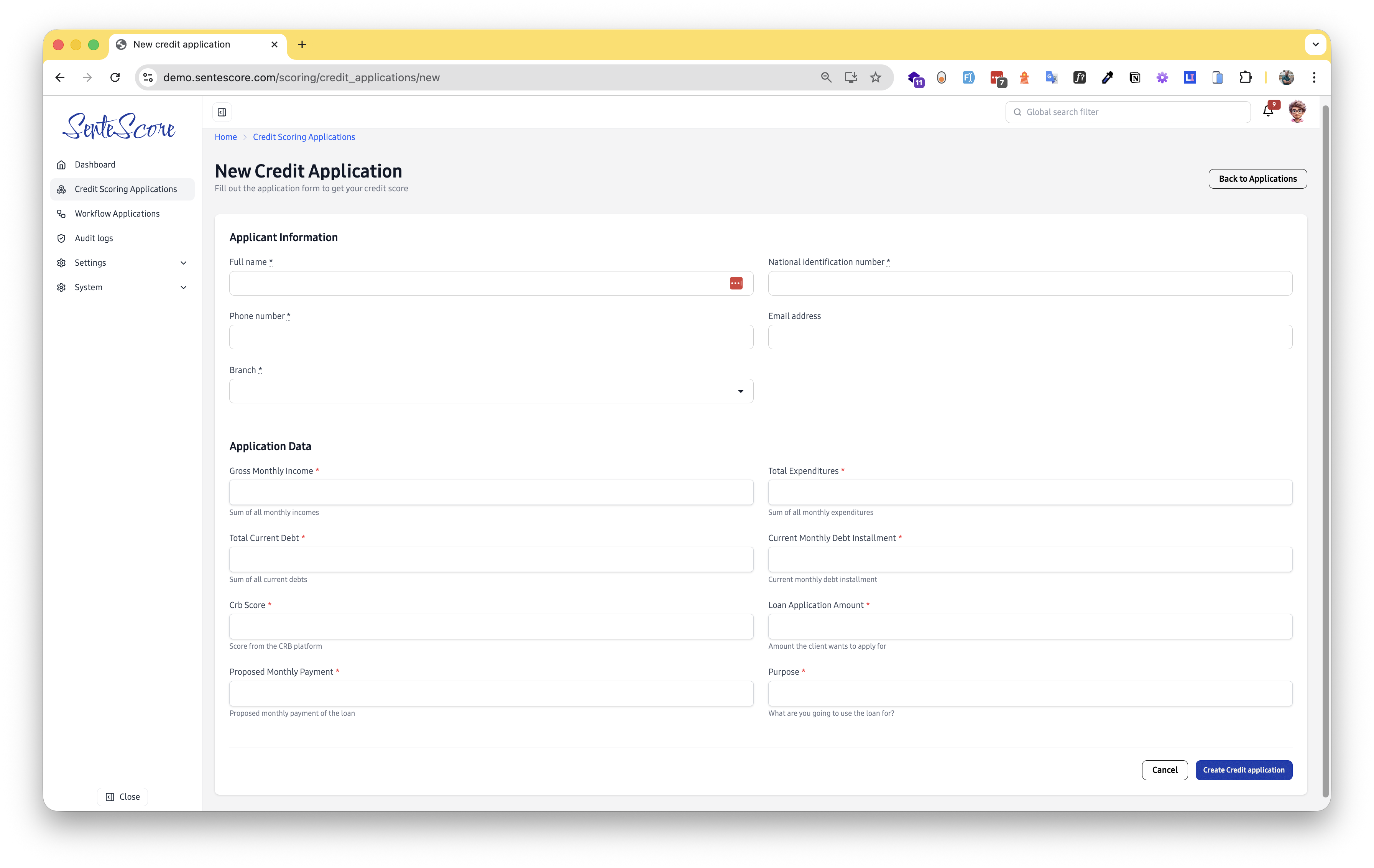
Page Overview
Section titled “Page Overview”The form collects all the information needed to generate a credit score and route the application through the appropriate decision workflow. Once submitted, the application is automatically scored and enters the configured approval chain.
Applicant Information
Section titled “Applicant Information”This section captures the personal identity details of the credit applicant. All fields marked with a red asterisk (*) are required.
| Field | Required | Description |
|---|---|---|
| Full Name | ✅ Yes | The applicant’s complete legal name. |
| National Identification Number (NIN) | ✅ Yes | The applicant’s government-issued national ID number. |
| Phone Number | ✅ Yes | The applicant’s primary contact number. |
| Email Address | No | The applicant’s email address. |
| Branch | ✅ Yes | The branch associated with this application, selected from a dropdown of configured branches. |
Field Validation Rules
Section titled “Field Validation Rules”- NIN — Must be a valid, correctly formatted national identification number. Invalid or malformed NINs will be rejected.
- Phone Number — Must be a valid phone number. The system validates the format and will not accept arbitrary numeric strings.
- Email Address — If provided, must be a properly formatted email address (e.g.
name@domain.com).
Application Data
Section titled “Application Data”This section captures the financial and loan-specific details used to compute the applicant’s credit score.
| Field | Description |
|---|---|
| Gross Monthly Income | The sum of all the applicant’s monthly incomes from all sources. |
| Total Expenditures | The sum of all the applicant’s monthly expenditures. |
| Total Current Debt | The total outstanding debt the applicant currently holds across all obligations. |
| Current Monthly Debt Installment | The amount the applicant is currently repaying each month toward existing debts. |
| CRB Score | The applicant’s score as retrieved from a Credit Reference Bureau (CRB) platform. |
| Loan Application Amount | The amount of money the applicant is requesting. |
| Proposed Monthly Payment | The monthly repayment amount the applicant is proposing for the requested loan. |
| Purpose | A brief description of what the applicant intends to use the loan for. |
Submitting the Application
Section titled “Submitting the Application”- Fill in all required Applicant Information fields, ensuring the NIN, phone number, and email (if provided) pass validation.
- Complete all Application Data fields shown for your organisation’s configuration.
- Click Create Credit Application to submit. The application is immediately scored and routed into the appropriate workflow.
- To discard the form without saving, click Cancel or Back to Applications.